


How Infrared Drying Systems Prevent Smudging in Corrugated Printing
Smudging in corrugated printing starts when ink reaches a roller, belt, guide, adjacent sheet, or converting surface before it can withstand that contact. An infrared drying system for corrugated printing helps by supplying radiant heat that accelerates water evaporation from water-based ink. When the dryer is correctly positioned and balanced with airflow and press speed, the printed surface becomes resistant to transfer before it reaches the next contact point.
The improvement depends on the cause of the defect. Infrared drying can address insufficient drying time, particularly on heavy solids or less absorbent liners. It cannot reliably correct poor ink adhesion, excessive ink application, or mechanical scuffing. Operators get better results by identifying where the mark first appears, then adjusting the drying process around that location.
Start by separating wet ink transfer from other print damage. A smeared barcode, a rubbed solid, and an image transferred onto the back of another sheet may look like the same drying problem. Their causes can differ, and increasing heater output without checking the defect can leave the original problem unresolved while introducing board distortion.
Wet ink transfer often produces a smear or a recognizable deposit on the surface that touched the print. Mechanical abrasion can damage an apparently dry ink film where sheets slide against guides or each other. Weak adhesion may allow ink to lift from the liner even after additional drying. These symptoms can overlap, so visual inspection should be followed by a controlled comparison of samples.
Using designated sampling points and approved procedures, compare sheets before and after the suspected contact location. Check whether the defect appears after a particular transport section, at the die-cutter, or only after stacking. Keep hands and test materials clear of moving equipment. The useful question is whether the print has enough resistance for the next operation at the moment it arrives there.
Infrared heat helps the ink lose water, but the moisture must leave the drying zone. In water-based flexographic printing, the liner absorbs part of the liquid while water also evaporates from the printed film. As water leaves, the binder develops the film properties needed to hold pigment on the surface. The balance between absorption, evaporation, and film development depends on both the ink and the liner.
Infrared emitters transfer energy to the ink and board through radiation. The amount absorbed depends on emitter wavelength, ink composition, paper characteristics, and dryer geometry. Heating raises the rate at which water can evaporate, helping the print reach a usable condition within the short interval available on the press. It does not make all inks and board grades respond identically.
Air movement completes the process by carrying moisture away from the sheet. If humid air remains near the printed surface, evaporation becomes less effective even as the board gets hotter. A dryer therefore needs suitable air distribution and moisture extraction as well as adequate radiant output. Restricted exhaust, obstructed airflow, or poor duct performance can make an otherwise capable system struggle.
This also explains why infrared drying and UV curing should not be treated as interchangeable processes. UV curing requires a compatible ink chemistry that reacts to the specified radiation. Infrared equipment used with water-based corrugated inks primarily supports drying through heat; it does not convert an unsuitable ink into a radiation-curable system.
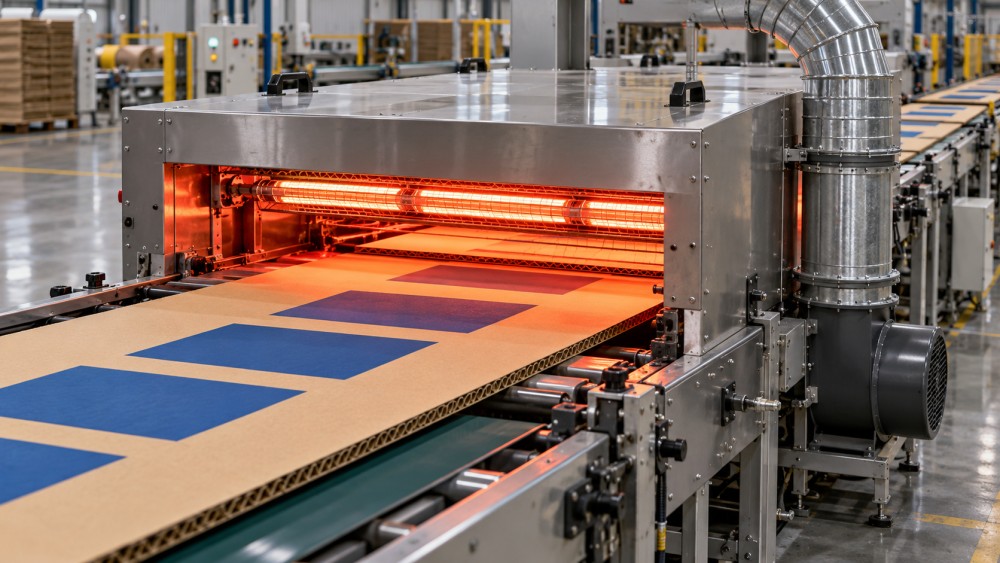
The dryer has to act before the contact that causes the smear. A dryer installed after the point where wet ink touches a transport component cannot prevent that first transfer. Mapping the sheet path is therefore essential. Identify the last print station, the available drying distance, and every subsequent point where the printed face may experience pressure or sliding contact.
Where the equipment layout allows it, drying between print stations can reduce unwanted transfer during subsequent printing. Drying after the final station prepares the sheet for conveying, die-cutting, folding, or stacking. The appropriate arrangement depends on where the defect originates. A delivery dryer may improve stack performance while leaving an earlier contact problem unchanged.
Exposure time changes with press speed. For a fixed dryer length, faster sheet movement gives each area less time under the emitters. A job that runs cleanly at a moderate speed can begin transferring ink when production accelerates, especially in areas with heavy coverage. Conversely, an output setting established at high speed may overheat sheets during slower running.
Speed-linked heater control helps manage this variation, but operators still need to verify its performance during acceleration, deceleration, and interruptions in sheet flow. Stops require functioning protective controls that reduce exposure or isolate the heat source as designed by the equipment manufacturer. A stopped sheet must not remain under uncontrolled radiant heat.
Build the operating setting around the job’s hardest area to dry. A small line of text and a dense background panel place different demands on the dryer. Heavy ink coverage introduces more liquid and may create a thicker film. Overprinted areas can be more difficult again. Testing only an open area of the design can give a misleading impression that the whole sheet is ready for converting.
Begin with the established recipe for the ink, liner, and press configuration, where one exists. Confirm that airflow and extraction are working, then run at a controlled speed and inspect the most demanding printed areas. Adjust within the equipment and ink suppliers’ operating guidance. Change one variable at a time so the effect remains identifiable.
If additional output reduces transfer, check the result again at the intended production speed and after stacking. If extra heat produces little improvement while sheet temperature continues to rise, investigate moisture removal, ink film weight, and ink compatibility. Repeatedly increasing power under those conditions can consume energy without delivering useful drying.
The liner can change the required setting substantially. An absorbent surface may accept liquid quickly, while a coated or less absorbent surface leaves more of the drying burden at the surface. Incoming board moisture, temperature, and construction also affect its response to heat. A recipe that works on one order should be treated as a starting point when the paper specification changes.
Check ink delivery alongside the dryer. Excessive anilox volume, poor metering, or an ink condition outside the supplier’s recommended range can increase the amount of liquid reaching the board. Viscosity and pH influence the behavior of water-based flexographic inks, but adjustments should follow the ink supplier’s procedure. Uncontrolled dilution can change print strength and drying behavior while creating additional process variation.
Use the pattern of the defect to choose the next adjustment. Several observations help narrow the investigation without changing multiple settings at once:
- Smearing appears only as speed increases: Check whether reduced exposure time exceeds the dryer’s effective capacity. Verify speed compensation, airflow, and extraction before increasing output.
- Heavy solids smear while fine text stays clean: Examine ink film weight and coverage. Compare metering performance and the ink condition with the established job settings.
- One side of the sheet dries differently: Inspect emitter condition, permitted heater alignment, airflow distribution, and the print itself for uneven ink application.
- The surface feels dry, but stacked sheets transfer ink: Evaluate the sheets under representative stacking pressure and holding time. Surface touch alone does not establish resistance to set-off or blocking.
- Dry print is damaged at a repeatable mechanical location: Check contact pressure, sliding, and ink adhesion. Additional drying may have limited value if abrasion is the main cause.
Cross-sheet differences deserve particular attention because an average temperature can conceal a local problem. A contaminated reflector, a failed emitter, or uneven air delivery may leave one region under-dried. Maintenance checks should follow isolation and cooling procedures. Restoring uniform performance may solve the defect more effectively than raising output across the entire width.
Verify drying against downstream handling, not just a finger-touch check. A light touch can reveal gross wetness, but it does not reproduce conveyor pressure, rubbing at a guide, or the conditions inside a stack. Use a consistent plant test method that reflects the failure being investigated. Keep the contact material, pressure, timing, and assessment method comparable between samples.
Where barcodes are affected, assess readability with the appropriate verification method after representative handling. A code can look acceptable at delivery and suffer damage during the next operation. For large graphics, inspect both the printed face and the contacting surface for transfer. Record whether the sample was checked immediately, after cooling, or after a defined period in the stack.
Temperature measurements help establish repeatable operating conditions, but temperature alone is not proof of dryness. An infrared thermometer or thermal camera can also give misleading readings if its setup and measurement position are unsuitable. Use temperature alongside transfer checks, appearance, and board condition. Maintain a consistent measurement location and method when comparing runs.
Excess heat creates its own production problems. Uneven moisture loss can contribute to curl or warp, affecting feeding, registration, and converting. Excessive drying can also impair the board’s subsequent handling and folding performance. Watch for changes in flatness, surface appearance, and crease behavior as heater settings rise. A sheet that leaves the printing section clean but becomes difficult to process has not reached a satisfactory operating condition.
For repeat jobs, record enough information to reproduce the result: board grade, ink identification, ink control readings, press speed, heater settings, airflow or exhaust settings, and the method used to assess transfer. Include observations from acceleration and stacking where those stages caused trouble. These records are more useful than a single “dryer temperature” entry because drying depends on the interaction of several variables.
The practical target is a stable operating window in which the ink survives the next contact, the board remains suitable for converting, and the dryer responds safely to speed changes. Once that window is established, recurring smudging becomes easier to investigate. A change in liner, ink delivery, airflow, or mechanical contact can be checked against a known working condition before more heat is added.
Related News
 How Do Flexo Wash-up Systems Reduce Ink Changeover Time?Discover how Flexo Wash-up Systems reduce ink changeover time, limit contamination, and improve press availability—and learn how to measure savings before investing.Print Fluidics Scientist
 How Can Flexo Wash-up Systems Reduce Press Downtime?Flexo Wash-up Systems reduce press downtime through consistent cleaning and faster changeovers. Discover how to prevent contamination and restart with confidence.Print Fluidics Scientist
 How Do Print Register Control Systems Improve Print Accuracy?Print Register Control Systems improve color alignment, reduce setup waste, and help prevent drift. Discover how they work and what to check for consistent print quality.Print Fluidics Scientist
 How to Choose Inline Color Measurement Systems for Flexo PressesChoose inline color measurement systems for flexo presses with confidence. Compare accuracy, substrate compatibility, integration, and production costs.Print Fluidics Scientist
 How to Choose a Printing Sleeve for a Flexographic PressChoose the right printing sleeve for your flexographic press. Compare fit, repeat length, materials and maintenance to improve print consistency.Print Fluidics Scientist
 How Impression Rollers Affect Flexographic Print QualityImpression Rollers can make or break flexographic print quality. Discover how to prevent common defects, protect substrates and improve consistency.Print Fluidics Scientist