


How Inkjet Printheads Affect Code Quality and Maintenance Costs
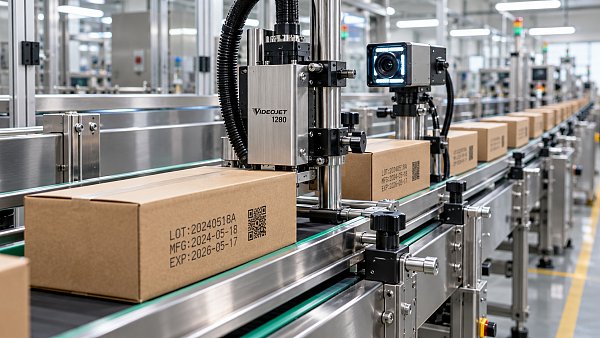
A coding line can appear stable at the start of a shift and still produce unreadable dates, weak barcodes, or intermittent missing characters later in the run. In packaging and commercial print environments, those defects are often traced to the printer only after rejected cartons, failed scans, or traceability gaps begin to accumulate. The printhead is usually at the center of that chain: its nozzle condition, firing behavior, ink interaction, and operating environment directly determine whether a code remains sharp and consistent.
The practical answer is that Inkjet Printheads affect both code quality and maintenance cost through the same mechanisms. A head that is kept wet, clean, correctly supplied with compatible ink, and protected from contamination can place controlled droplets in the intended position. A head with blocked nozzles, unstable ink delivery, damaged nozzle plates, or poor environmental control produces defects that require more cleaning, more troubleshooting, more consumables, and eventually earlier replacement. The goal is not simply to recover print quality when it fails, but to identify the condition that caused the failure before routine service turns into unplanned downtime.
Why a small nozzle issue can become a traceability problem
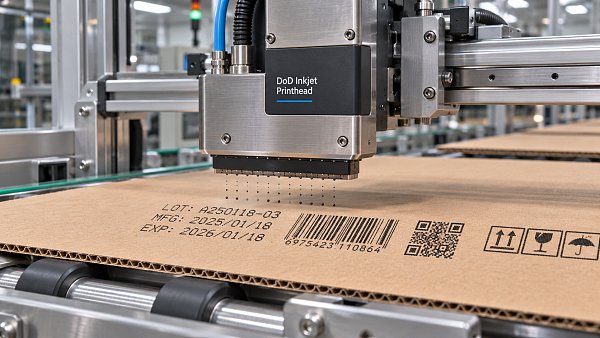
Inkjet coding depends on thousands of rapid and repeatable droplet ejections. Each nozzle must deliver the intended droplet volume, velocity, and direction. On a carton, corrugated case, label, film, or coated board, the final result also depends on how that droplet spreads, dries, and remains visible under production handling.
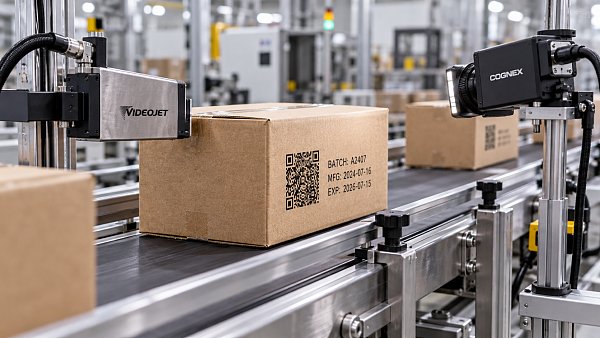
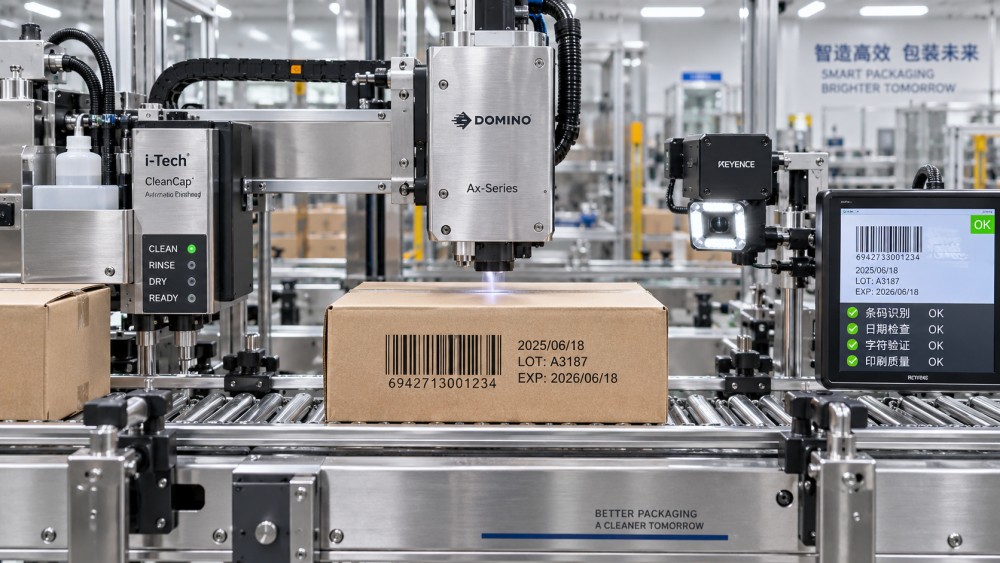
A partially blocked nozzle may not make an entire message disappear. More often, it causes a thin white line through characters, broken barcode bars, pale areas in a logo, or an incomplete dot matrix. These are easy to overlook when an operator checks only whether text is present. A vision system or scanner may identify a failure that looks minor to the eye, especially where the code contains dense data, narrow bars, small characters, or high-contrast requirements.
Deflected nozzles create a different pattern. Instead of a missing line, droplets land outside their intended position. Characters can look fuzzy, edges may show satellite dots, and nearby printed elements can merge. On high-speed production lines, the effect may be confused with conveyor vibration or incorrect print distance. The maintenance task is to separate a true printhead fault from an application setup problem before replacing parts unnecessarily.
Print quality symptoms and the conditions behind them
Not every poor code points to the same root cause. A useful service approach begins by recording the defect pattern, the substrate, the ink type, the running conditions, and whether the fault changes after cleaning. This narrows the investigation more effectively than performing repeated cleaning cycles without evidence.
The condition of the nozzle plate deserves particular attention. Dust, paper fibers, dried ink, coating particles, adhesive mist, and airborne corrugated debris can settle on the print face. Even when contamination does not fully block a nozzle, it can disturb droplet trajectory. Wiping too aggressively can introduce another problem: physical damage to the nozzle surface or residue transferred from unsuitable cleaning materials.
Ink compatibility is a maintenance issue, not only a color issue
Ink is part of the printhead operating system. A fluid that performs well on one platform may not be appropriate for another head design, waveform, circulation arrangement, or cleaning method. Compatibility includes more than whether the ink can be loaded into a reservoir. It involves viscosity behavior, pigment or dye stability, solvent interaction, drying characteristics, surface tension, filtration needs, and the way residues respond to the approved cleaning fluid.
Using an unverified ink can lead to gradual problems rather than immediate failure. Deposits may form near the nozzle face, filters may load faster, and drying behavior during short production stops may change. Maintenance teams then see rising cleaning demand, unstable recovery after purging, or recurring faults on the same color channel. Repeated manual intervention can mask the underlying fluid mismatch until printhead performance has already been reduced.
Substrate changes can create a similar misunderstanding. A code that looks dense and well-defined on a coated label may feather on porous corrugated board. Conversely, ink that dries correctly on absorbent material may remain vulnerable to smudging on a non-porous coated surface if curing or drying conditions are inadequate. Before adjusting the printhead, confirm whether the defect is created at droplet ejection or after the droplet reaches the substrate.
Questions to ask before changing ink or cleaning chemistry
- Is the ink approved for the specific printhead and fluid system?
- Has the substrate grade, coating, moisture condition, or surface treatment changed?
- Was the printer left idle longer than the normal capping and purge routine assumes?
- Are the cleaning fluid, wipes, swabs, and procedures appropriate for the ink chemistry?
- Did the defect begin after a maintenance action, a filter change, or a software setting adjustment?
These questions are not administrative details. They help prevent a common maintenance error: treating every failed nozzle test as an isolated head blockage when the source may be ink handling, exposure during idle time, or a changed production material.
The cost path from poor code to higher service demand
A printhead problem increases cost in several layers. The most visible cost is lost production time while personnel clean, purge, prime, test, and restart the printer. Less visible costs include wasted cartons or labels, additional ink consumption from repeated purging, cleaning consumables, inspection effort, and the need to segregate products with uncertain code quality. Where a batch code, serial number, or barcode supports downstream tracking, a questionable print may create rework decisions that extend beyond the coding station.
Over-cleaning is especially expensive because it can become routine. When a printer requires frequent intervention, the immediate response is often to run stronger or longer cleaning cycles. That may restore output temporarily, but excessive purging consumes ink and can accelerate waste generation. Unnecessary contact cleaning may also put the nozzle plate at risk. The correct measure of maintenance performance is not how quickly a head can be cleaned; it is how reliably it stays within acceptable print quality between planned service intervals.
Premature printhead replacement is another avoidable cost. A head should not be treated as failed solely because one test pattern is imperfect. First establish whether the affected nozzles recover after the approved cleaning sequence, whether the fault repeats under normal operating conditions, and whether electrical, fluidic, mechanical, and environmental causes have been ruled out. At the same time, a damaged or persistently unstable head should not be kept in service merely because it can print a visually acceptable sample. Coding applications often have less tolerance for drift than decorative graphics.
A disciplined way to troubleshoot declining code quality
When code defects first appear, start with a controlled observation rather than broad adjustment. Capture a nozzle test or sample at the actual production distance and speed. Compare it with a known acceptable sample where available. Look for repeatable missing lines, directional overspray, gradual fading, or defects that occur only after a stop. The pattern matters because it points toward different corrective actions.
- Confirm the application conditions. Check print distance, printhead angle, product position, encoder or trigger stability, conveyor vibration, and the time between print and inspection. A mechanically unstable product path can mimic nozzle deflection.
- Inspect the print face safely. Use the approved procedure and lighting to look for dried ink, fibers, splashing, scratches, or contact marks. Do not scrape deposits or use unapproved tools on the nozzle plate.
- Run the prescribed recovery sequence. This may include capping, purging, wiping, or automated cleaning, depending on the equipment. Record whether nozzle recovery is complete, partial, or absent.
- Check the ink delivery path. Verify ink level, supply connections, filters, pressure or circulation status where applicable, and signs of air ingress. Intermittent starvation can produce a defect that comes and goes.
- Review recent changes. New ink batches, different board grades, longer idle periods, changed room conditions, maintenance work, or revised print settings can all explain a sudden shift in behavior.
- Validate with the actual code. A clean nozzle test is not enough. Print the production message at the required size and location, then inspect readability, contrast, edge definition, and barcode performance using the relevant internal acceptance method.
This sequence reduces unnecessary part swaps because it moves from external conditions toward the printhead itself. It also produces a clearer service record. A maintenance log that only says “cleaned head” has limited value. A useful record notes the defect pattern, ink and substrate, downtime duration, corrective action, recovery result, and whether the issue returned after normal running.
Idle time, humidity, and contamination often decide head life
Production schedules rarely keep a printer running continuously. Job changes, material shortages, inspections, and line stops expose the nozzle face to drying. The longer the idle period, the more important the cap seal and automatic maintenance routine become. A cap that does not seal correctly can allow solvent loss or ink drying at the nozzles. Operators may see the result only when the next order starts, leading them to blame start-up settings rather than the period of inactivity.
Ambient conditions affect both ink behavior and contamination risk. High dust levels near corrugated converting equipment can deposit fibers on the head. Excessive heat may accelerate drying; cold conditions can alter fluid behavior and print consistency. Humidity can affect paper surfaces and substrate absorption, changing how a printed code appears even when the head is firing correctly. The response should be practical: protect the print zone, keep covers and caps clean, prevent direct contamination from nearby processes, and ensure that operating limits defined for the equipment and ink are respected.
Printhead-to-product distance should also be treated as a controlled condition. A larger gap gives droplets more time to deviate and makes the code more sensitive to air movement and substrate motion. A gap that is too small increases the risk of product contact, especially on warped board, raised seams, or inconsistent carton surfaces. The best setting is not simply the closest possible position; it is a stable, safe distance that maintains placement accuracy across normal product variation.
Turning routine maintenance into prevention
Preventive maintenance works best when it is based on observed failure modes. A line that regularly experiences paper dust needs stronger contamination control and appropriate nozzle-face inspection. A printer that sits idle between short jobs may need disciplined capping and start-up verification. A system producing variable-data codes may require more frequent functional checks because a minor defect can affect readability before it becomes visually obvious.
Build maintenance around a few repeatable controls: use approved ink and cleaning materials, maintain clean caps and wiping components, monitor filter and fluid-system condition, verify print distance after mechanical adjustments, and preserve samples or digital inspection records when recurring defects are investigated. Training should distinguish between a nozzle blockage, a substrate-wetting problem, and a triggering or motion problem. Those faults can look similar from a distance but demand very different actions.
Where a head repeatedly loses the same nozzles, fails to recover through the approved sequence, shows physical nozzle-face damage, or produces unstable output after fluid and setup checks, the issue has moved beyond routine cleaning. Escalation should include the recorded defect history and the conditions under which it occurs. That information helps determine whether the next step is a component inspection, a fluid-system review, a calibration check, or printhead replacement rather than another cycle of trial-and-error maintenance.
Related News
 How Do Drop on Demand Inkjet Printers Control Ink Droplets?Discover how Drop on Demand Inkjet Printers control droplets through precise firing, ink formulation, and substrate handling for sharper codes and graphics.Machine Vision & Coding Fellow
 What Affects the Price of a Carton Coding Machine?Carton coding machine price depends on printing technology, speed, automation, and running costs. Discover how to compare quotes and choose the best value for your production line.Machine Vision & Coding Fellow
 How to Choose a Variable Data Printing Machine for PackagingChoose the right variable data printing machine for packaging. Compare material compatibility, speed, data control, and inspection to reduce waste and make a confident investment.Machine Vision & Coding Fellow
 How Can an Online TIJ Printer System Prevent Missing Batch Codes?Discover how an online TIJ printer system helps prevent missing batch codes with reliable triggers, vision inspection, and verified rejection. Reduce rework and protect traceability.Machine Vision & Coding Fellow
 Industrial Inkjet Printer Market Forecast to Reach $9.2 Billion by 2035Industrial inkjet printer market forecast: $9.2 billion by 2035. Explore how packaging traceability, automation, and CIJ and TIJ technologies could shape equipment investment.Machine Vision & Coding Fellow
 How Does Variable Data Printing for Cartons Improve Traceability?Discover how variable data printing for cartons improves traceability with verified codes and linked records to help locate affected stock and support faster recall decisions.Machine Vision & Coding Fellow